Firecrawl in Production: What 28 Job Postings Taught Me
I benchmarked 15 extraction strategies on 28 real job postings. Raw markdown won 27-0 over provider schema mode, which was silently returning summaries.
By Muhammad Ali
TL;DR. I benchmarked 15 extraction strategies against 28 real job postings with verbatim ground truth. Raw markdown plus my own verbatim-prompted model got 27 of 28 exactly right. Asking a provider to extract the same field with a schema got 0 of 28, at 5% recall, while looking perfectly healthy in production. A two-pass scrape with waitFor costs about $0.86 per thousand exact extractions; provider-side JSON mode costs $14.53.
The scrape call I wrote in a weekend for a hackathon is still, in substance, the one running in production today. Everything that changed sits around it. The expensive lesson was that asking a scraping provider to extract structured data with a schema handed me tidy summaries instead of actual job descriptions, at 5% recall, and nothing in the system looked broken. Raw markdown plus my own verbatim-prompted model scored 27 out of 28.
I build two things that eat job postings for a living. MockReady turns a posting into a live voice mock interview, built in a weekend for ElevenHacks Season 1. JobMason turns one into a full application kit, and it's the live product I run rather than a weekend build. Both start the same way: someone pastes a URL, and I have to come back with the text of that job. Here's what survived contact with the actual web.
The bug that doesn't look like a bug
JobMason's original extraction path called Exa's /contents endpoint with a summary schema. Ask for a jobDescription field, get a jobDescription field. The JSON was well-formed every time. Field names matched. The prose read like a job posting.
It was scoring 0 out of 28, with 5% mean recall against the real text.
Think about what that failure looks like from the outside. No exception. No 500. No empty string to null-check. The resume JobMason generated off that description came back plausible and slightly generic, and if you'd asked me why, I would have blamed the resume prompt. I spent time on the resume prompt.
This is the thing about scraping inside an LLM product: your failures are usually quality failures, not errors. A summary of a job posting passes every check you'd think to write. It has the right shape, the right vocabulary, roughly the right length. It just isn't the posting. This is the same instinct that led me to build TinyPort and measure what an import actually costs: the number you get handed is not always the number you need, and you can't tell by looking. The same silent-failure shape shows up in what long contexts do to a coding agent, where quality drops without anything raising an error. It's also why I'll publish a benchmark like this one but refuse to put a number on my own productivity: extraction accuracy has a definition, and "how much faster am I" doesn't.
How I actually measured it
I stopped guessing and built a fixture set. Twenty-eight job URLs spanning 24 platforms and applicant tracking systems, each with its verbatim description stored as ground truth, plus two probes at Glassdoor and Monster to see what a hard bot wall does. Then I ran 15 extraction strategies across all of them: Firecrawl, Exa, Cloudflare Browser Rendering across five separate endpoints, Tavily, ScrapingBee, Oxylabs, Apify, and Parallel. That run was 2026-06-07.
The metric matters more than the tooling. I scored each extraction by 8-word-shingle recall: chop the ground truth into overlapping 8-word runs, and count how many appear in what came back. Above 85% I called EXACT, above 50% PARTIAL, below 50% SUMMARY.
Shingles, not embeddings, and that's deliberate. Cosine similarity between a job posting and a good summary of it is high, because a good summary is semantically similar. That's the failure I was trying to catch. Shingle recall has no opinion about meaning and asks only whether the words are still there.
Two caveats before the numbers, both load-bearing. This is 28 pages, in one vertical, on one day. Job boards are an unusually hostile corner of the web, with more SPAs and more bot walls than most, so treat the method as transferable and the table as mine. And the benchmark code sits in a private repo alongside JobMason, so you can't run mine. You don't need to: a fixture directory of URLs with their correct text, a shingle-recall function, and a loop over providers is an afternoon of work, and it's the afternoon that pays for itself.
Take the markdown, do the structuring yourself
Here's what came back, sorted by exact extractions. I've cut the rows that only repeat a point (four of Cloudflare's five endpoints, Tavily's basic mode, the LinkedIn-only actor) and kept the ones that carry an argument:
| Strategy | Kind | EXACT | Mean recall | Mean latency |
|---|---|---|---|---|
Firecrawl markdown + waitFor |
raw | 27/28 | 98% | 8.8s |
| Firecrawl markdown | raw | 26/28 | 95% | 2.6s |
| Oxylabs universal | raw | 25/28 | 96% | 22.3s |
| Tavily advanced | raw | 23/28 | 94% | 3.6s |
| Exa text | raw | 21/28 | 86% | 5.2s |
Cloudflare /markdown |
raw | 20/28 | 86% | 4.2s |
| ScrapingBee (JS render) | raw | 20/28 | 74% | 3.3s |
Cloudflare /json schema |
LLM extraction | 12/28 | 87% | 109.0s |
| Firecrawl JSON schema | LLM extraction | 8/28 | 67% | 11.6s |
| Exa summary schema | LLM extraction | 0/28 | 5% | 2.6s |
Every raw-markdown strategy beat every provider-side extraction strategy. That's not a close call, and once you see why, it stops being surprising.
When you hand a provider a schema with a jobDescription: string field, you're instructing a model to produce a string. Models asked to produce a string compress. Nothing in that request says "reproduce six thousand characters exactly," so it doesn't. The schema is a shape, not a fidelity contract.
So I do the structuring myself, and I say the quiet part explicitly, twice:
const MarkdownJobSchema = z.object({
  jobTitle: z.string().describe("The job title or position name. Empty string if not present."),
  company: z.string().describe("The hiring company or organization name. Empty string if not present."),
  jobDescription: z.string().describe(
    "The complete job description exactly as written on the page: responsibilities, requirements, " +
    "qualifications, compensation, benefits, EEO statements. Copy verbatim as plain text - never " +
    "summarize, shorten, or paraphrase. Empty string if not present."
  ),
})

const { output } = await generateText({
  model: AI_MODEL,
  output: Output.object({ schema: MarkdownJobSchema }),
  system:
    "You extract structured job-posting data from web-page markdown. Copy the job description " +
    "text verbatim and complete - never summarize, shorten, or paraphrase it, and do not omit " +
    "sections. Ignore navigation, headers, footers, ads, and unrelated content.",
  prompt: markdown,
  temperature: 0,
})
The instruction lives in the system prompt and again in the field description, because the field description is what a lot of tooling actually forwards to the model. temperature: 0. This is boring and it works.
There's a billing joke buried here too. Firecrawl's docs note that operations cost different amounts of credits, and JSON extraction costs more than a basic scrape. The worse answer is the more expensive one.
Two passes beat one long timeout
Single-page apps broke my first version in a way that took a while to see. Workday, Eightfold, iCIMS: you request the page, you get markdown back, the request succeeds, and the markdown is an un-hydrated shell. The job isn't in the HTML yet.
Firecrawl's fix is waitFor, a delay in milliseconds before it grabs the content, applied on top of its own smart wait. NVIDIA's Workday posting is the clearest case I have: a plain scrape scored SUMMARY 0% in 2.4 seconds, and the same scrape with waitFor scored EXACT 99% in 10.8 seconds.
The obvious move is to always wait. Don't. Waiting 8 seconds on every request takes mean latency from 2.6s to 8.8s to fix a case you hit twice in 28. Instead, run a quick pass and let it ask for the slow one:
const DEEP_SCAN_WAIT_MS = 8_000
const QUICK_SCRAPE_TIMEOUT_MS = 30_000
const DEEP_SCRAPE_TIMEOUT_MS = 45_000

// A quick-pass description shorter than this is an un-hydrated shell
// or a truncated "show more" page, not a short job posting.
const MIN_QUICK_DESCRIPTION_CHARS = 200
A description under 200 characters isn't a terse employer, it's a page that hadn't finished loading. That triggers the deep retry. Two things fall out of that design that I didn't anticipate.
The first is that the retry decision belongs to the caller, not the scraper. My scrape function returns needsDeepScan rather than silently blocking for 30 more seconds, so the interface can say "this one's slow, still working" instead of showing a spinner that looks hung. A silent 30-second wait is a bug even when it eventually succeeds.
The second is budget arithmetic. The deep scrape gets 45 seconds inside a route with maxDuration = 60, which leaves room for the extraction model to run afterward. Pick the scrape timeout by subtracting from the platform limit, not by picking a round number that feels generous.
On cost: the deep pass is billed as a second ordinary scrape, so a deep extraction is two scrapes rather than a premium tier. That's my read of my own bill, not a vendor guarantee, so verify it against your plan before you build a budget on it.
Which errors deserve a retry?
Most of the code I added after the hackathon is this one distinction. Every failure is either recoverable, meaning a deep pass might genuinely fix it, or terminal, meaning the same backend will give you the same answer and you're wasting the user's time:
type MarkdownFetch =
  | { ok: true; markdown: string }
  | { ok: false; recoverable: boolean; userError?: string }
Timeouts are recoverable. Markdown under 100 characters is recoverable. A thin description is recoverable. Auth failures, rate limits, and 5xx are not, because the retry hits the same wall.
Then there's 403, which is two completely different errors wearing one status code:
const siteUnsupported =
  response.status === 403 && /do not support this site/i.test(errorBody)
Firecrawl returns 403 with "we do not support this site" for domains it won't touch. That's a policy decision about the target, not a problem with my credentials, and conflating the two produces the worst possible support experience: a user told to contact support about a site that will never work, or an expired API key reported as a blocked website. They map to different copy.
| What happened | What it means | What the user sees |
|---|---|---|
| 403 + "do not support this site" | Provider won't scrape this domain | "This site blocks automated scraping. Please paste the job description manually." |
| 401 / other 403 | My credentials are wrong | "Scraping service rejected our credentials. Please contact support." |
| 429 | I'm being rate limited | "We're being rate limited. Please try again in a minute." |
| 5xx | Their problem | "The scraping service is having issues. Please try again shortly." |
| Timeout, or body under 100 chars | Possibly an un-hydrated SPA | Nothing. Retry deep first. |
Every one of those messages tells the user what to do next. That matters more than the status code.
Every chain needs an escape hatch
No provider in my run covered everything, and the gaps weren't where I expected:
- LinkedIn: all three Firecrawl strategies returned 403, and Cloudflare's crawl endpoint got a 400 with "crawl completely disallowed by robots.txt". Plenty of other providers read that URL fine, which is the point: the gap was specific to the provider I'd standardized on.
- Workday: broke Exa, ScrapingBee, and all five Cloudflare endpoints. Firecrawl, Tavily, and Oxylabs each got it at 98% or better.
- Indeed: both Tavily modes failed to fetch it. Firecrawl got EXACT 100% in 0.9 seconds.
There's no ranking here that holds across every row. Each provider has its own set of pages it silently can't do, and the sets don't overlap neatly.
So the production path routes by URL shape before spending a request it knows will fail:
export function isLinkedInJobUrl(url: URL): boolean {
  const host = url.hostname.toLowerCase()
  if (host !== "linkedin.com" && !host.endsWith(".linkedin.com")) return false
  return url.pathname.startsWith("/jobs/")
}
LinkedIn job URLs skip Firecrawl entirely and go to a pay-per-result Apify actor at a cent per job. I went to a dedicated actor rather than one of the generalists that handled my benchmark URL, because the URLs users actually paste are job-view pages that want you logged in, and those behave worse in production than the one posting I happened to fixture. Exa's crawler, which scored 99% on that fixture, throws crawler errors on the real ones. Chained together, quick pass lands 26 of 28, the deep retry picks up the SPA shells, and Apify takes LinkedIn. That's 28 of 28.
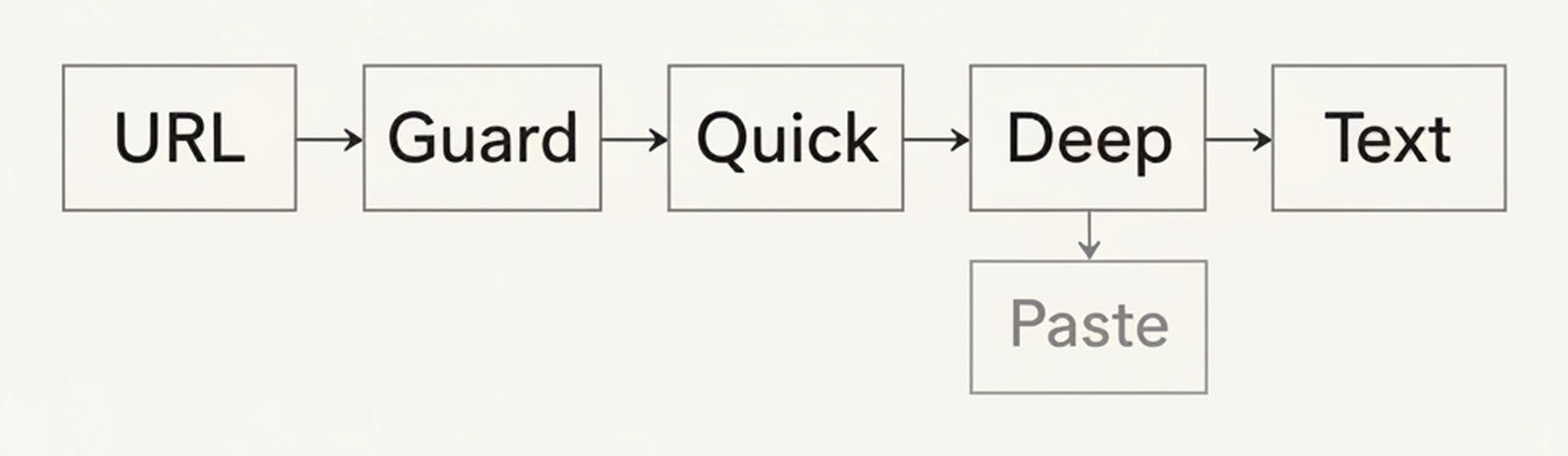
I want to be precise about what that escape hatch costs, because "just add a fallback" is cheap advice. Apify runs about $10 per thousand extractions against Firecrawl's $0.83. It's worth it for one domain I can't otherwise serve. It would be a terrible general strategy.
The bot walls are the other half of this. Glassdoor and Monster were probes rather than scored cases, and Firecrawl at least returned a body where most providers failed outright. Returning a body is not the same as getting the posting. Some pages you are not going to win, and the correct engineering answer is a paste box and a clear message, which is exactly what the hackathon version already had.
Guard the URL before you hand it to a scraper
Nobody's scraping tutorial mentions this and every one of them should. The URL comes from a user. That's server-side request forgery waiting to happen, so it gets checked before it reaches any provider:
export function isBlockedHost(hostname: string): boolean {
  const host = hostname.toLowerCase()
  if (!host) return true
  if (host === "localhost" || host.endsWith(".localhost")) return true
  const ipLiteral = host.startsWith("[") && host.endsWith("]") ? host.slice(1, -1) : host
  const ipKind = isIP(ipLiteral)
  if (ipKind === 4 && isPrivateIPv4(ipLiteral)) return true
  if (ipKind === 6 && isPrivateIPv6(ipLiteral)) return true
  return false
}
Non-http(s) protocols, localhost, private IPv4 ranges, private and link-local IPv6, IPv4-mapped IPv6. Fine.
Now the part I'd rather write than have someone find for me: this check does not resolve DNS, so it would not stop a DNS rebinding attack. A hostname that resolves to 127.0.0.1 sails straight through it. The reason that's acceptable in my case is that my server never fetches the URL. Firecrawl and Apify do, from their infrastructure, with their own resolution, so a private address never causes my process to connect to internal services. The guard is defense in depth, not the control.
Be clear about what that buys, though. It protects my network, not the internet's. Handing a hostile URL to a third-party fetcher is still abuse, it just lands on someone else's egress, and the provider's own protections are what stand between a user and their internal network. Rate limiting and a sane view of what your users should be scraping matter as much as the IP check.
If you fetch user-supplied URLs directly from your own server, you need more than this: resolve the hostname with all addresses, reject if any resolve to private space, and pin the connection to the address you validated. Otherwise the name you checked and the address you connect to are two different things.
Budget the bytes, moderate before the prompt
Two constants, one contract. 48,000 characters of page markdown go into the extraction model. 16,000 characters flow downstream into storage, moderation, and generation.
The invariant worth stealing: moderation covers at least as much text as any model reads. And it runs on the scraped page before that page becomes prompt body, because a scraped page is untrusted text from a stranger's website that you are about to feed to an LLM. Flagged content doesn't get a deep retry, since scraping the same URL twice returns the same content.
What does running Firecrawl in production actually cost?
Price per thousand extractions is the wrong denominator, because it prices attempts and you need answers. Divide by the exact rate instead:
Effective cost = price per 1,000 ÷ (EXACT ÷ 28). What a thousand usable extractions cost once the misses have to be retried elsewhere or fixed by hand.
| Strategy | EXACT | $/1k raw | $/1k effective |
|---|---|---|---|
Cloudflare /markdown |
20/28 | $0.13 | $0.18 |
| ScrapingBee (JS render) | 20/28 | $0.50 | $0.70 |
Firecrawl markdown + waitFor |
27/28 | $0.83 | $0.86 |
| Firecrawl markdown | 26/28 | $0.83 | $0.89 |
| Oxylabs universal | 25/28 | $1.10 | $1.23 |
| Exa text | 21/28 | $1.00 | $1.33 |
| Tavily advanced | 23/28 | $3.00 | $3.65 |
Cloudflare /json schema |
12/28 | $4.72 | $11.01 |
| Firecrawl JSON schema | 8/28 | $4.15 | $14.53 |
| Exa summary schema | 0/28 | $2.00 | ∞ |
Every raw price there is normalized to a thousand single-page extractions with JS rendering on, priced off a specific paid tier per provider (Firecrawl's 100k-credit Standard plan, Oxylabs Micro, Tavily's Project plan, and so on), as of 2026-06-07. Your rate will differ on a different tier, and the free tiers change the picture completely.
The ranking inverts. On the price list, Firecrawl's JSON mode looks like a five times premium over markdown. Measured against how often it gives you the right answer, it's seventeen times. And the path I was actually running in production had no finite cost per exact extraction at all, because it never produced one.
I left Apify off that table on purpose. It only ever ran against LinkedIn, and a single case doesn't divide into a rate honestly. At $0.01 per result it's $10 per thousand, roughly twelve times the Firecrawl path, and I pay it for one domain because the alternative is nothing.
The full chain runs about $0.83 per thousand when the quick pass is enough, and about $1.66 when the deep retry fires, since that second scrape bills like the first. Most URLs cost the lower number. Prices move, too: Apify's actor went from free to a cent a job on 2026-04-07, and Cloudflare was the cheapest raw fetch in the run while having the worst bot-wall coverage.
What I'd tell myself at the hackathon
Here's the weekend version, in full:
const result = await firecrawl.scrape(url, { formats: ["markdown"] })
And the production one, after all of that:
const response = await fetch("https://api.firecrawl.dev/v2/scrape", {
  method: "POST",
  signal: AbortSignal.timeout(deep ? DEEP_SCRAPE_TIMEOUT_MS : QUICK_SCRAPE_TIMEOUT_MS),
  headers: { "Content-Type": "application/json", Authorization: `Bearer ${apiKey}` },
  body: JSON.stringify({
    url: targetUrl,
    formats: ["markdown"],
    ...(deep ? { waitFor: DEEP_SCAN_WAIT_MS } : {}),
  }),
})
I dropped the SDK for raw fetch to get at the abort signal, but that's the same request either way: POST /v2/scrape, markdown format. What actually got added is a timeout and one conditional parameter. Everything else I've described is measurement, retry policy, an error taxonomy, a guard, and a byte budget. None of it is scraping.
The weekend build also got something right that I kept: a paste box, wired up before any of the clever parts, which is still the last fallback in production. Ship the manual path first. It's the only branch that never fails.
If there's one thing to take from this, it isn't my table. It's that I couldn't see a path running at 5% until I had 28 pages with known-correct answers sitting on disk, and building that took an afternoon. Silent quality regressions don't throw. You have to go looking.
Next on my list is testing Parallel's Extract API as a cheap first tier for server-rendered boards, where it hit 18 of 28 at about $1.56 effective. It has no JS-render control, so the SPA tail still needs Firecrawl behind it. Three of its misses were postings that had expired between runs rather than failures, which is its own lesson about benchmarking against a live web.
MockReady is on GitHub if you want to see the weekend version, JobMason is live at jobmason.ai, and both sit alongside the other things I have built. If you're fighting a scraper that's technically succeeding, tell me about it on X, I'm @AliFoundry.
FAQ
Should I use a scraping API's built-in JSON or schema extraction? For classification or a handful of short fields, it's fine. For anything that has to stay verbatim, no. In my run, provider schema modes scored 8/28 and 0/28 against 27/28 for raw markdown plus my own extraction call, and they cost more credits per page.
Does waitFor fix every JavaScript-rendered page?
No. It fixed the SPA-based applicant tracking systems I hit, notably Workday and Eightfold. It does nothing for auth walls, and nothing for a domain the provider refuses to scrape at all.
Why not just run Playwright myself? You can, and plenty of people should. Understand what you're buying though: a hosted scraping API isn't saving you from parsing HTML, it's saving you from proxies, bot walls, and running browser infrastructure. If your targets are friendly, self-hosting is cheaper and more controllable.
How do I know my extraction is actually working? Keep 20 to 30 real pages with verbatim ground truth and score recall against them on a schedule. Quality regressions don't raise exceptions, so nothing else will tell you.
Sources
- waitFor is an integer parameter defaulting to 0 that specifies a delay in milliseconds before fetching the content, allowing the page sufficient time to load, in addition to Firecrawl's smart wait feature.
- Operations cost different amounts of credits - for example Interact and JSON extraction cost more than a basic scrape - so heavier usage reaches the credit cap sooner.
- The cryptosignals LinkedIn jobs scraper actor is billed pay-per-result, used in JobMason's LinkedIn path at $0.01 per job.
- Cloudflare Browser Rendering exposes REST endpoints including /markdown, /content, /scrape and /json, benchmarked here across five endpoints.
- Exa's /contents endpoint returns page text and optional summaries, and was JobMason's original extraction path.
- Tavily's extract endpoint offers basic and advanced modes, both benchmarked here.
- Parallel's Extract API returns excerpts or full page content and exposes no JavaScript-render or wait control.